Dirt Town Demo Walkthrough
The free Dirt Town demo drops you on a small map with a dozer, a wheel loader, a hauler and one job card. This walkthrough covers the download, all four jobs, the exact conditions players got stuck on, and the bugs to avoid.
Last checked November 26, 2026 against official screenshots, the Steam forum and demo videos.
Download the Dirt Town demo free from Steam ("Download Dirt Town Demo" on the store page). The job card "Sand haul & more" has four jobs: haul 40 t of sand to the pad, find the hidden red truck, jump the river in that truck, and push the boulder up the hill. Players report finishing all four in about two hours.
How to download the Dirt Town demo
- Open the Dirt Town Demo page on Steam or the main Dirt Town page and click Download Dirt Town Demo.
- It is free and needs about 500 MB of disk space. The PC and Mac requirements are the same as the full game. Check yours on the Dirt Town system requirements page.
- Launch it from your Steam library. If Windows 11 blocks it with error 0x11C7, see the fix on that page.
The demo has been on Steam since November 13, 2026. By November 26 it had 732 reviews, 95% positive ("Overwhelmingly Positive"). It is a single-player build: you cannot invite friends.
What is in the Dirt Town demo?
According to the demo's Steam page, you get a small map with missions and these vehicles:
- Dozer: for pushing roads and ramps
- Wheel loader: for loading material
- Hauler: the articulated dump truck
- A secret vehicle you have to find (the red pickup, below)
The excavator is on the map but locked. Its sign says it is out of order and waiting for parts, with an estimated arrival of December 4th, the Early Access date.
Get into a machine with F. If you get stuck or flood the engine in deep water, press Backspace while seated to respawn the machine. All keys are on the Dirt Town controls page.
Job 1: Haul 40 t of sand to the pad
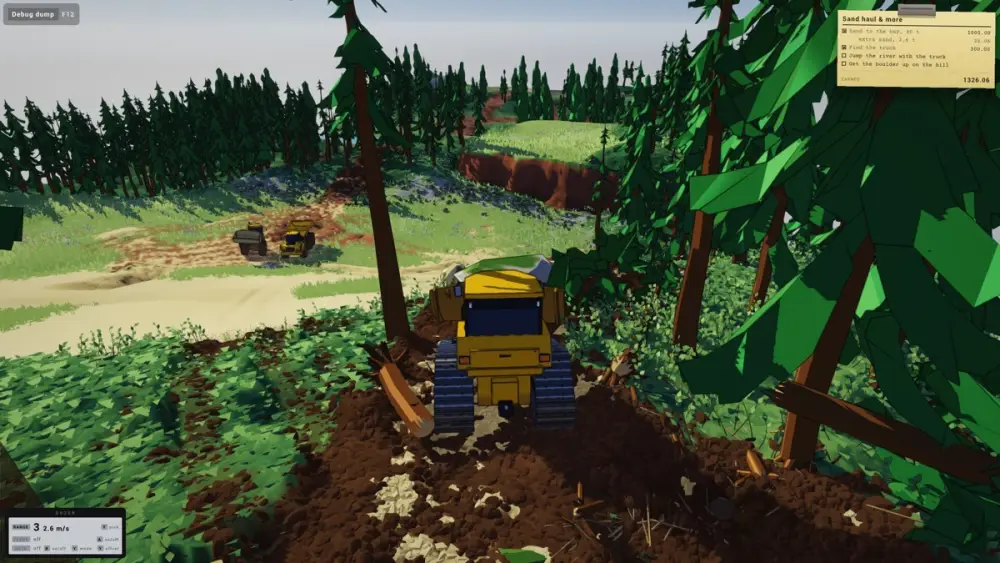
This is the main job. The sand pit is across the river, and the hauler needs a road to get there.
- Use the dozer and the gravel pile at the start pad to push a road through the forest to the river.
- Build a crossing the hauler can drive over. Players fill in the river with gravel or build a causeway.
- At the sand pit, load the hauler with the wheel loader. One creator found about two buckets (three at most) fill the truck, at roughly 20 t a load. Other players logged 8–15 t, so it depends on how you load.
- Drive back and dump at the pad. The counter on the job card rises as you dump until it reaches 40 t.
The official screenshot of the finished card shows 1000.00 for the 40 t of sand, and 26.06 for 2.6 t of extra sand on top.
Job 2: Find the hidden truck
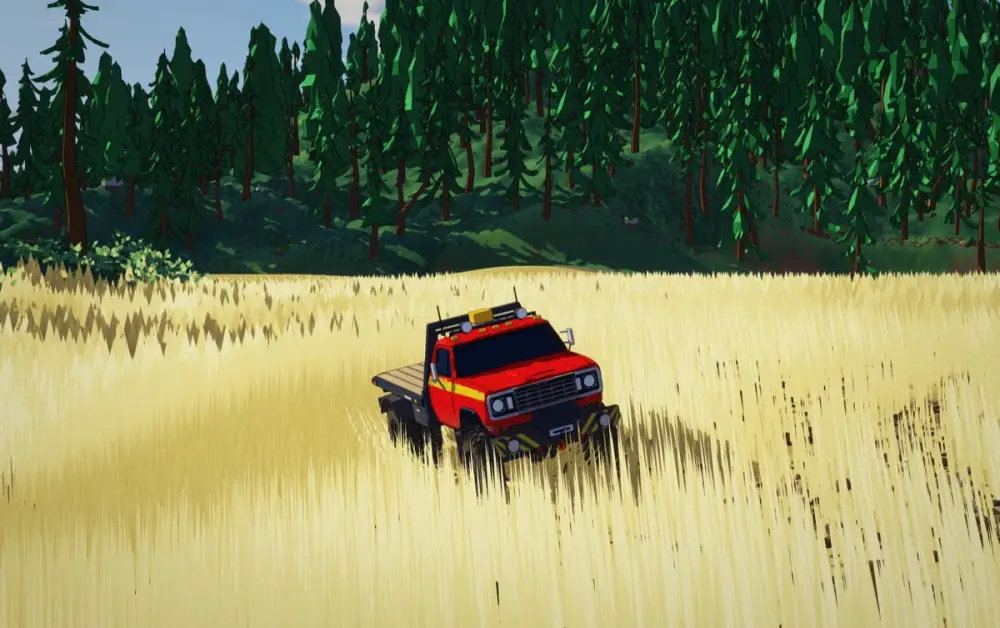
The secret vehicle is a red flatbed 4×4 pickup. Players and video creators found it on a hill across the river, near the sand pit and close to the map edge. Getting into it completes "Find the truck". The card shows 300.00 for it.
Job 3: Jump the river with the truck
This is the job most players get stuck on, so read the condition carefully. Players on the Steam forum found that:
- It only counts in the red pickup. Jumping the hauler did not count.
- The truck has to be in the air over actual water. Jumping over your own gravel causeway or road did not count.
- What works: push a ramp with the dozer at the river bank, give it a long run-up and jump across open water.
One player reported that the end summary didn't tick the river jump even after doing it. If that happens, check the job card itself.
Job 4: Get the boulder up on the hill
The boulder is the large rock in yellow grass on the far side of the river, to the right after you cross. It goes on top of the nearby two-tier hill, not the hill where the truck is parked. Most players push it with the dozer. Some lift it into the hauler with the loader instead.
Careful near the edges: the map has no walls. A boulder or empty vehicle that falls off does not come back, and players had to restart the map.
Dirt Town demo bugs and tips
- Loader bucket in the river. A detached loader bucket in the river can keep digging and drop the frame rate to about 5 fps. The developer confirmed the bug, and restarting the map is the only fix for now.
- Vehicle fell off the map. Backspace only works while you sit in the machine. An empty vehicle pushed off the map can't be recovered without a restart.
- Hauler keeps its load after Backspace. Players report the bed stays loaded after a respawn.
- Grading. Press G to show the grade grid: blue needs fill, red needs cutting, green is on grade. Grade sticks and auto-level are explained on the controls page.
- When you're done. The completion message invites you to keep hauling, so you can keep shaping the map after the four jobs.
Dirt Town demo FAQ
Is the Dirt Town demo multiplayer?
No. Steam lists the demo as single-player only. Online co-op for up to four players comes with Early Access.
Can I use the excavator in the demo?
No. It is parked on the map with an out-of-order sign saying it is waiting for parts until December 4th. It is part of Early Access.
What does the money do in the demo?
Nothing yet. The job card shows payouts, but there is nothing to buy in the demo.
Where is the Dirt Town demo save?
Players report it in C:\Users\<your name>\AppData\Roaming\Dirt Town Demo on Windows.
Sources: Dirt Town Demo on Steam, official store screenshots, Steam forum threads (players' reports are marked as such), and demo videos by QuadThumb Gaming, Kerbo and Raptor (Nov 14–19, 2026).